The Formuler Box and MAG device are two of the best dedicated IPTV streaming boxes available. This guide covers the full setup — MAC portal for MAG boxes and MYTV Online 2 for Formuler — with real screenshots at every step. Works for all Formuler models including the Z7+, Z8, and Z10.
Formuler Z8 / Z10 and MAG Box — two of the most popular dedicated IPTV streaming devices
DevicesFormuler & MAG Box
App usedMYTV Online 2
Time neededUnder 8 minutes
4K supportYes (Z8, Z10)
Login formatMAC Portal / M3U
DifficultyBeginner-friendly
Two Devices, Two Setups — Which One Do You Have?
Before diving into the steps, here's a quick overview of what each device supports. Both work great for IPTV — the setup is slightly different.
📦
MAG Box
One of the most popular dedicated IPTV boxes. Uses a MAC address-based portal system — simple, reliable, and widely supported.
MAC PortalM3U Playlist
🦊
Formuler Box
Latest-generation Android-based IPTV box running MYTV Online 2. Supports 4K Ultra HD, EPG, catch-up TV, and both portal and M3U login.
4K Ultra HDMYTV Online 2
ℹ️
This guide focuses on Formuler Box setup via MYTV Online 2.
The steps below apply to all Formuler models (Z7+, Z8, Z8 Pro, Z10). MAG Box users enter the Portal URL directly in the MAG portal settings menu — same URL logic applies.
Unlock geo-blocked content, stop ISP throttling & protect up to 10 devices — 74% OFF + 3 months free
→
What You Need Before Starting
Have these three things ready before you begin — the whole setup takes under 8 minutes when everything is on hand.
Formuler Box or MAG device — any model (Z7+, Z8, Z8 Pro, Z10, or MAG 520/522/524)
MYTV Online 2 app — pre-installed on most Formuler boxes; download from Google Play if missing
Active IPTV subscription — your provider sends you a Portal URL and activates your MAC address
Stable internet connection — minimum 10 Mbps for HD, 25 Mbps for 4K
💡
Need an IPTV subscription?
IPTV The Fox is fully compatible with Formuler and MAG devices — 18,000+ live channels, instant activation, and 24/7 support. Get started here →
1 Launch MYTV Online 2 App
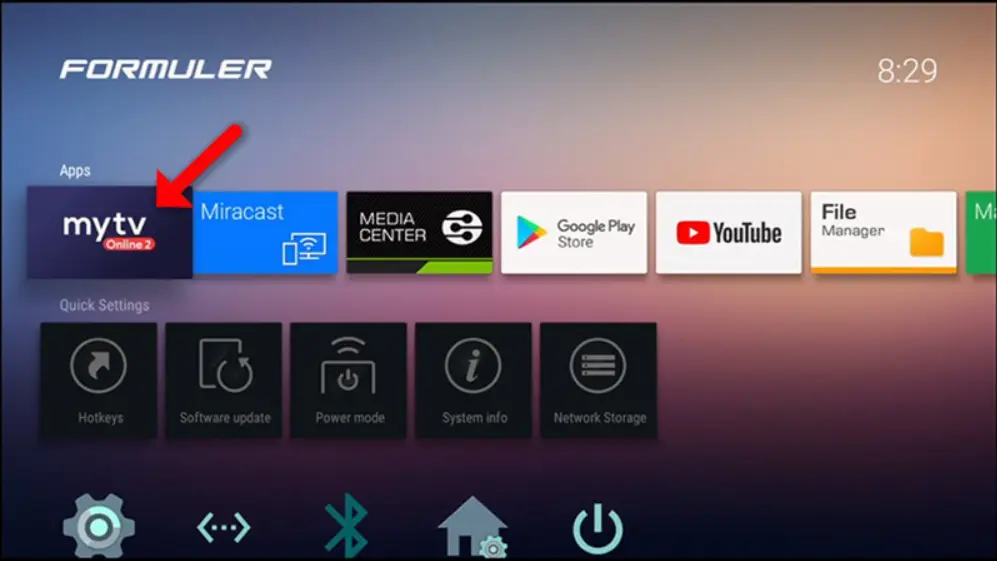
Turn on your Formuler Box and open the MYTV Online 2 app from the home screen. If it's not installed, go to the Google Play Store on your Formuler, search for "MYTV Online 2", and install it for free.
ℹ️
Make sure you open MYTV Online 2 — not the older MYTV Online (version 1). The newer version has a better interface and supports 4K and catch-up TV.
The MYTV Online 2 home screen on a Formuler Box — your starting point for the setup
2 Locate Your MAC Address & Tap Add Portal
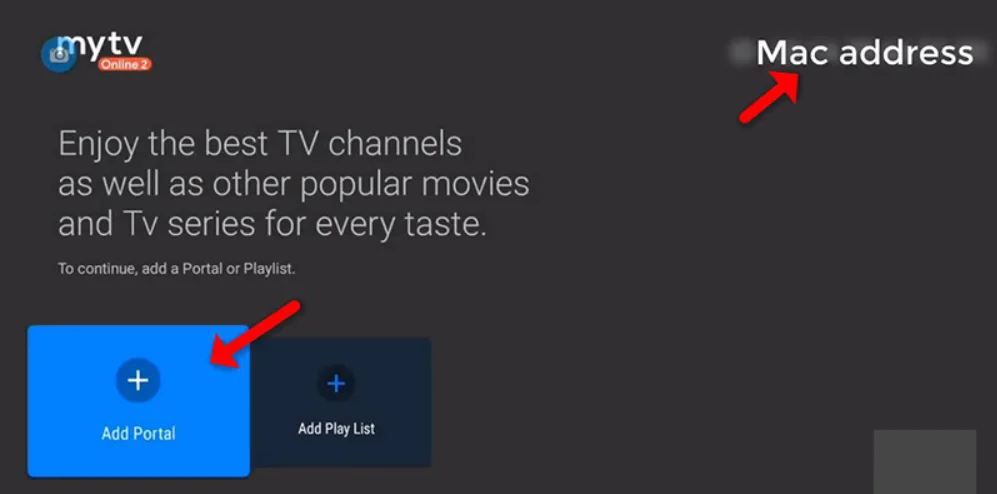
Once MYTV Online 2 is open, look at the top right corner of the screen — your device's MAC address is shown there. It looks like: AA:BB:CC:DD:EE:FF
Share this MAC address with your IPTV provider. They'll activate your subscription on this specific device. Once they confirm, tap "Add Portal" to continue.
⚠️
Important: Your IPTV subscription is tied to your MAC address. If you replace your Formuler Box, share the new device's MAC address with your provider to re-activate.
Your MAC address is in the top right — share it with your provider, then tap "Add Portal"
3 Enter Portal Name & URL, Tap CONNECT
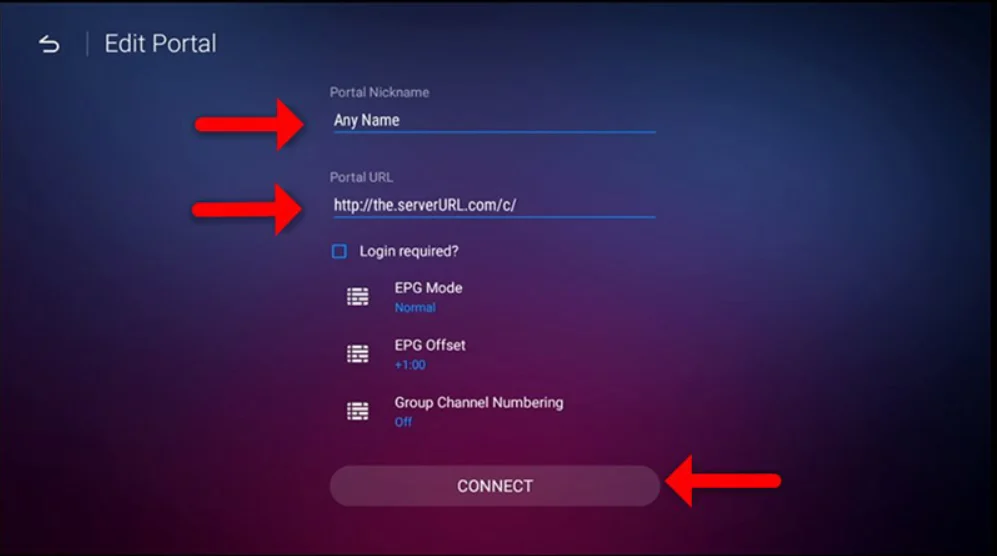
After tapping "Add Portal", you'll see two fields:
Portal Nickname — any label you want, e.g. IPTV The Fox
Portal URL — the server address from your provider (starts with http:// or https://)
Enter the Portal URL exactly as provided — copy-paste directly from your welcome email to avoid typos. Then tap CONNECT.
💡
Pro tip: Use a clear name for the Portal Nickname — especially useful if you plan to add multiple portals later. You can always rename it afterward in the app settings.
Enter your portal nickname and URL from your provider, then tap CONNECT
4 Finalize Connection & Browse Channels
After tapping CONNECT, MYTV Online 2 connects to your provider's server and loads your full channel list. This takes 5–30 seconds — don't tap anything while it loads.
Once done, you'll see your complete lineup: Live TV, Movies, and Series. Tap any channel to start streaming instantly. From now on, MYTV Online 2 remembers your portal — just open the app and everything loads automatically.
💡
4K on Formuler Z8 / Z10: If your subscription includes 4K channels and your TV supports it, 4K streams play natively. Use an HDMI 2.0 or higher cable and make sure your TV input is set to 4K mode.
Frequently Asked Questions
Yes. This guide works for all Formuler models including the Z7+, Z8, Z8 Pro, and Z10. All of them run the MYTV Online 2 app and use the same portal-based setup described above.
Your MAC address is displayed in the top right corner of the MYTV Online 2 home screen. It's a 12-character code formatted as AA:BB:CC:DD:EE:FF. Share this with your IPTV provider so they can activate your subscription on your device.
Yes. Formuler boxes support both MAC-based portal login and M3U playlist login. If your provider gives you an M3U URL, add it in MYTV Online 2 using the M3U playlist option from the add portal screen.
Check that the Portal URL was entered correctly with no extra spaces or typos. Make sure your subscription is active and your provider has registered your MAC address. Restart the app and try again. Contact your IPTV provider's support team if the issue continues.
Yes — Formuler Z8, Z8 Pro, and Z10 support 4K Ultra HD streaming. Your provider must offer 4K channels, and you'll need at least 25 Mbps internet for stable 4K playback.
MAG boxes use a simple MAC-based portal system by Infomir. Formuler boxes are more powerful Android-based devices running MYTV Online 2, with added features like 4K, catch-up TV, a full EPG, and the ability to install other apps. Both are excellent for IPTV.
🦊 Ready to Watch? Get Your IPTV Subscription
IPTV The Fox works perfectly on Formuler Box and MAG devices. 18,000+ live channels, 130,000+ VOD titles, HD & 4K quality, and instant activation.